Blame view
Pods/Toaster/README.md
3.01 KB
d774f0637
 fisrt comit
|
1 2 3 4 5 6 7 8 9 10 11 12 13 14 15 16 17 18 19 20 21 22 23 24 25 26 27 28 29 30 31 32 33 34 35 36 37 38 39 40 41 42 43 44 45 46 47 48 49 50 51 52 53 54 55 56 57 58 59 60 61 62 63 64 65 66 67 68 69 70 71 72 73 74 75 76 77 78 79 80 81 82 83 84 85 86 87 88 89 90 91 92 93 94 95 96 97 98 99 100 101 102 103 104 105 106 107 108 109 110 111 112 113 114 115 116 117 118 |
Toaster
=======
[](https://travis-ci.org/devxoul/Toaster)

[](http://cocoapods.org/?q=name%3AToaster%20author%3Adevxoul)
[](https://github.com/Carthage/Carthage)
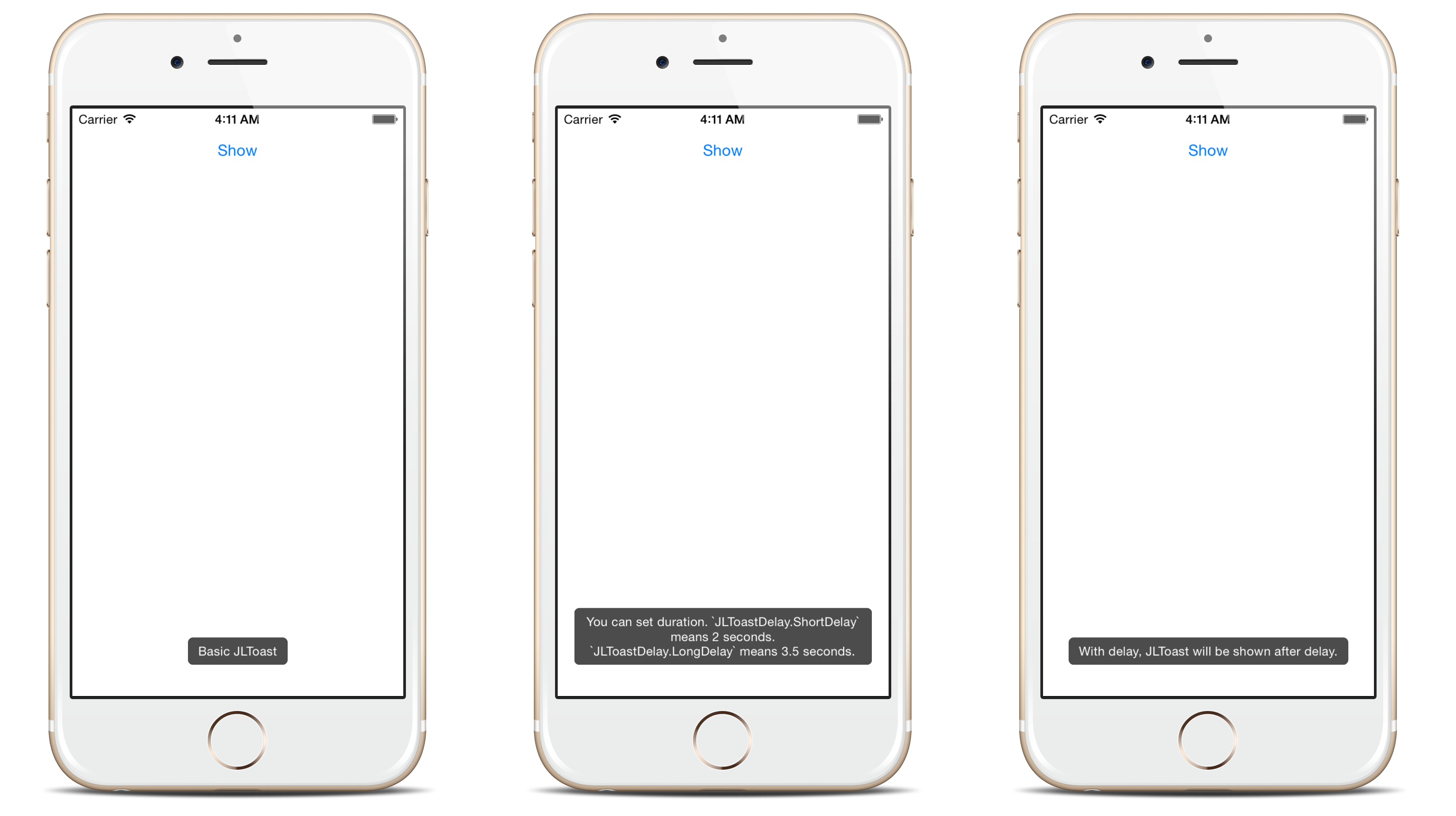
Android-like toast with very simple interface. (formerly JLToast)
Toaster is written in Swift 3.0. If you're looking for Swift 2 compatible version, see the [JLToast 1.4.2](https://github.com/devxoul/JLToast/tree/1.4.2).
Features
--------
- **Queueing**: Centralized toast center manages the toast queue.
- **Customizable**: See the [Appearance](#appearance) section.
At a Glance
-----------
```swift
import Toaster
Toast(text: "Hello, world!").show()
```
Installation
------------
- **For iOS 8+ projects with [CocoaPods](https://cocoapods.org):**
```ruby
pod 'Toaster', '~> 2.0'
```
- **For iOS 8+ projects with [Carthage](https://github.com/Carthage/Carthage):**
```
github "devxoul/Toaster" ~> 2.0
```
- **For iOS 7 projects:** I recommend you to try [CocoaSeeds](https://github.com/devxoul/CocoaSeeds), which uses source code instead of dynamic frameworks. Sample Seedfile:
```ruby
github 'devxoul/Toaster', '2.0.3', :files => 'Sources/*.{swift,h}'
```
Getting Started
---------------
### Setting Duration and Delay
```swift
Toast(text: "Hello, world!", duration: Delay.long)
Toast(text: "Hello, world!", delay: Delay.short, duration: Delay.long)
```
### Removing Toasts
- **Removing toast with reference**:
```swift
let toast = Toast(text: "Hello")
toast.show()
toast.cancel() // remove toast immediately
```
- **Removing current toast**:
```swift
if let currentToast = ToastCenter.default.currentToast {
currentToast.cancel()
}
```
- **Removing all toasts**:
```swift
ToastCenter.default.cancelAll()
```
### Appearance
Since Toaster 2.0.0, you can use `UIAppearance` to set default appearance. This is an short example to set default background color to red.
```swift
ToastView.appearance().backgroundColor = .red
```
Supported appearance properties are:
| Property | Type | Description |
|---|---|---|
| `backgroundColor` | `UIColor` | Background color |
| `cornerRadius` | `CGFloat` | Corner radius |
| `textInsets` | `UIEdgeInsets` | Text inset |
| `textColor` | `UIColor` | Text color |
| `font` | `UIFont` | Font |
| `bottomOffsetPortrait` | `CGFloat` | Vertical offfset from bottom in portrait mode |
|` bottomOffsetLandscape` | `CGFloat` | Vertical offfset from bottom in landscape mode |
Screenshots
-----------
License
-------
Toaster is under [WTFPL](http://www.wtfpl.net/). You can do what the fuck you want with Toast. See [LICENSE](LICENSE) file for more info.
|