Blame view
Pods/SCLAlertView/README.md
8.08 KB
d774f0637
 fisrt comit
|
1 2 3 4 5 6 7 8 9 10 11 12 13 14 15 16 17 18 19 20 21 22 23 24 25 26 27 28 29 30 31 32 33 34 35 36 37 38 39 40 41 42 43 44 45 46 47 48 49 50 51 52 53 54 55 56 57 58 59 60 61 62 63 64 65 66 67 68 69 70 71 72 73 74 75 76 77 78 79 80 81 82 83 84 85 86 87 88 89 90 91 92 93 94 95 96 97 98 99 100 101 102 103 104 105 106 107 108 109 110 111 112 113 114 115 116 117 118 119 120 121 122 123 124 125 126 127 128 129 130 131 132 133 134 135 136 137 138 139 140 141 142 143 144 145 146 147 148 149 150 151 152 153 154 155 156 157 158 159 160 161 162 163 164 165 166 167 168 169 170 171 172 173 174 175 176 177 178 179 180 181 182 183 184 185 186 187 188 189 190 191 192 193 194 195 196 197 198 199 200 201 202 203 204 205 206 207 208 209 210 211 212 213 214 215 216 217 218 219 220 221 222 223 224 225 226 227 228 229 230 231 232 233 234 235 236 237 238 239 240 241 242 243 244 245 246 247 248 249 250 251 252 253 254 255 256 257 258 259 260 261 262 263 264 265 266 267 268 269 270 271 |
SCLAlertView
===========
[](http://cocoadocs.org/docsets/SCLAlertView/)
[](https://github.com/Carthage/Carthage)
Animated Alert View written in Swift, which can be used as a `UIAlertView` or `UIAlertController` replacement. Since `UIAlertView` is deprecated and `UIAlertController` only works on iOS 8.x or above, if you have a Swift project where you want to support iOS 7.x too, SCLAlertView is an ideal substitution.
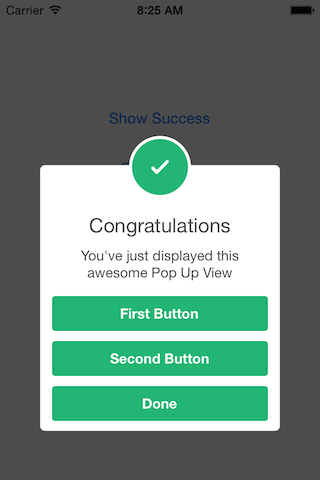_
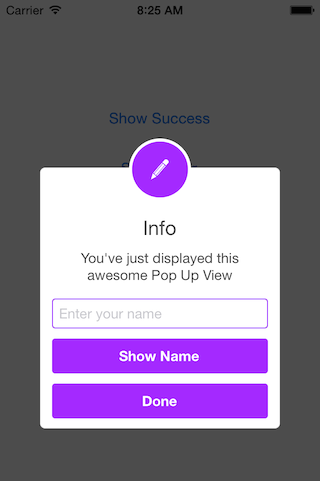
Easy to use
----
### Get Started
```swift
// Get started
SCLAlertView().showInfo("Important info", subTitle: "You are great")
```
### Updating the alert view
```swift
let alertViewResponder: SCLAlertViewResponder = SCLAlertView().showSuccess("Hello World", subTitle: "This is a more descriptive text.")
// Upon displaying, change/close view
alertViewResponder.setTitle("New Title") // Rename title
alertViewResponder.setSubTitle("New description") // Rename subtitle
alertViewResponder.close() // Close view
```
### Alternative alert types
```
SCLAlertView().showError("Hello Error", subTitle: "This is a more descriptive error text.") // Error
SCLAlertView().showNotice("Hello Notice", subTitle: "This is a more descriptive notice text.") // Notice
SCLAlertView().showWarning("Hello Warning", subTitle: "This is a more descriptive warning text.") // Warning
SCLAlertView().showInfo("Hello Info", subTitle: "This is a more descriptive info text.") // Info
SCLAlertView().showEdit("Hello Edit", subTitle: "This is a more descriptive info text.") // Edit
```
### Raw call to showTitle()
```swift
SCLAlertView().showTitle(
"Congratulations", // Title of view
subTitle: "Operation successfully completed.", // String of view
duration: 2.0, // Duration to show before closing automatically, default: 0.0
completeText: "Done", // Optional button value, default: ""
style: .Success, // Styles - see below.
colorStyle: 0xA429FF,
colorTextButton: 0xFFFFFF
)
```
### Controls
#### Custom Appearance
```swift
// SCLAlertView.SCLAppearanc has more than 15 different properties to customize. See below.
let appearance = SCLAlertView.SCLAppearance(
kTitleFont: UIFont(name: "HelveticaNeue", size: 20)!,
kTextFont: UIFont(name: "HelveticaNeue", size: 14)!,
kButtonFont: UIFont(name: "HelveticaNeue-Bold", size: 14)!,
showCloseButton: false
)
let alert = SCLAlertView(appearance: appearance)
```
#### Add buttons
```swift
let alertView = SCLAlertView()
alertView.addButton("First Button", target:self, selector:Selector("firstButton"))
alertView.addButton("Second Button") {
println("Second button tapped")
}
alertView.showSuccess("Button View", subTitle: "This alert view has buttons")
```
#### Hide default close button
```swift
let appearance = SCLAlertView.SCLAppearance(
showCloseButton: false
)
let alertView = SCLAlertView(appearance: appearance)
alertView.showSuccess("No button", subTitle: "You will have hard times trying to close me")
```
#### Hide default close button & a duration to close the alert
```swift
let appearance = SCLAlertView.SCLAppearance(
showCloseButton: false
)
let alertView = SCLAlertView(appearance: appearance)
alertView.showWarning("No button", subTitle: "Just wait for 3 seconds and I will disappear", duration: 3)
```
#### Hide alert icon
```swift
let appearance = SCLAlertView.SCLAppearance(
showCircularIcon: false
)
let alertView = SCLAlertView(appearance: appearance)
alertView.showSuccess("No icon", subTitle: "This is a clean alert without Icon!")
```
#### Use a custom icon
```swift
let appearance = SCLAlertView.SCLAppearance(
showCircularIcon: true
)
let alertView = SCLAlertView(appearance: appearance)
let alertViewIcon = UIImage(named: "IconImage") //Replace the IconImage text with the image name
alertView.showInfo("Custom icon", subTitle: "This is a nice alert with a custom icon you choose", circleIconImage: alertViewIcon)
```
#### Add Text fields
```swift
// Add a text field
let alert = SCLAlertView()
let txt = alert.addTextField(title:"Enter your name")
alert.addButton("Show Name") {
println("Text value: \(txt.text)")
}
alert.showEdit("Edit View", subTitle: "This alert view shows a text box")
```
#### Use a custom subview instead of a subtitle
```swift
// Example of using the view to add two text fields to the alert
// Create the subview
let appearance = SCLAlertView.SCLAppearance(
kTitleFont: UIFont(name: "HelveticaNeue", size: 20)!,
kTextFont: UIFont(name: "HelveticaNeue", size: 14)!,
kButtonFont: UIFont(name: "HelveticaNeue-Bold", size: 14)!,
showCloseButton: false
)
// Initialize SCLAlertView using custom Appearance
let alert = SCLAlertView(appearance: appearance)
// Creat the subview
let subview = UIView(frame: CGRectMake(0,0,216,70))
let x = (subview.frame.width - 180) / 2
// Add textfield 1
let textfield1 = UITextField(frame: CGRectMake(x,10,180,25))
textfield1.layer.borderColor = UIColor.greenColor().CGColor
textfield1.layer.borderWidth = 1.5
textfield1.layer.cornerRadius = 5
textfield1.placeholder = "Username"
textfield1.textAlignment = NSTextAlignment.Center
subview.addSubview(textfield1)
// Add textfield 2
let textfield2 = UITextField(frame: CGRectMake(x,textfield1.frame.maxY + 10,180,25))
textfield2.secureTextEntry = true
textfield2.layer.borderColor = UIColor.blueColor().CGColor
textfield2.layer.borderWidth = 1.5
textfield2.layer.cornerRadius = 5
textfield1.layer.borderColor = UIColor.blueColor().CGColor
textfield2.placeholder = "Password"
textfield2.textAlignment = NSTextAlignment.Center
subview.addSubview(textfield2)
// Add the subview to the alert's UI property
alert.customSubview = subview
alert.addButton("Login") {
print("Logged in")
}
// Add Button with Duration Status and custom Colors
alert.addButton("Duration Button", backgroundColor: UIColor.brownColor(), textColor: UIColor.yellowColor(), showDurationStatus: true) {
print("Duration Button tapped")
}
alert.showInfo("Login", subTitle: "", duration: 10)
```
#### List of properties to customize
````swift
// Button
kButtonFont: UIFont
buttonCornerRadius : CGFloat
showCloseButton: Bool
kButtonHeight: CGFloat
// Circle Image
showCircularIcon: Bool
kCircleTopPosition: CGFloat
kCircleBackgroundTopPosition: CGFloat
kCircleHeight: CGFloat
kCircleIconHeight: CGFloat
// Text
kTitleFont: UIFont
kTitleTop:CGFloat
kTitleHeight:CGFloat
kTextFont: UIFont
kTextHeight: CGFloat
kTextFieldHeight: CGFloat
kTextViewdHeight: CGFloat
// View
kDefaultShadowOpacity: CGFloat
kWindowWidth: CGFloat
kWindowHeight: CGFloat
shouldAutoDismiss: Bool // Set this false to 'Disable' Auto hideView when SCLButton is tapped
fieldCornerRadius : CGFloat
contentViewCornerRadius : CGFloat
```
### Alert View Styles
```swift
enum SCLAlertViewStyle: Int {
case Success, Error, Notice, Warning, Info, Edit, Wait
}
```
### Alert show animation Styles
```swift
// Animation Styles
public enum SCLAnimationStyle {
case NoAnimation, TopToBottom, BottomToTop, LeftToRight, RightToLeft
}
```
Installation
---
SCLAlertView is available through [CocoaPods](http://cocoapods.org).
To install add the following line to your Podfile:
pod 'SCLAlertView'
Collaboration
---
I tried to build an easy to use API, while beeing flexible enough for multiple variations, but I'm sure there are ways of improving and adding more features, so feel free to collaborate with ideas, issues and/or pull requests.
Incoming improvements
---
- More animations
- Performance tests
Has been developed initially for the [Scroll Feed](https://itunes.apple.com/us/app/scroll-feed/id842422195?ls=1&mt=8) app
- Design [@SherzodMx](https://twitter.com/SherzodMx) Sherzod Max
- Development [@vikmeup](https://twitter.com/vikmeup) Viktor Radchenko
- Improvements by [@bih](http://github.com/bih) Bilawal Hameed, [@rizjoj](http://github.com/rizjoj) Riz Joj
|